We remain fully operational. Our teams are working around the clock to ensure your deliveries continue safely.

DOWNLOAD THE APP


Copyright © 2025 Desertcart Holdings Limited
DOWNLOAD THE APP





Buy anything from 5,000+ international stores. One checkout price. No surprise fees. Join 2M+ shoppers on Desertcart.
Desertcart purchases this item on your behalf and handles shipping, customs, and support to Saint Vincent and the Grenadines.
🎮 Elevate Your Game: Experience the Future of Gaming Today!
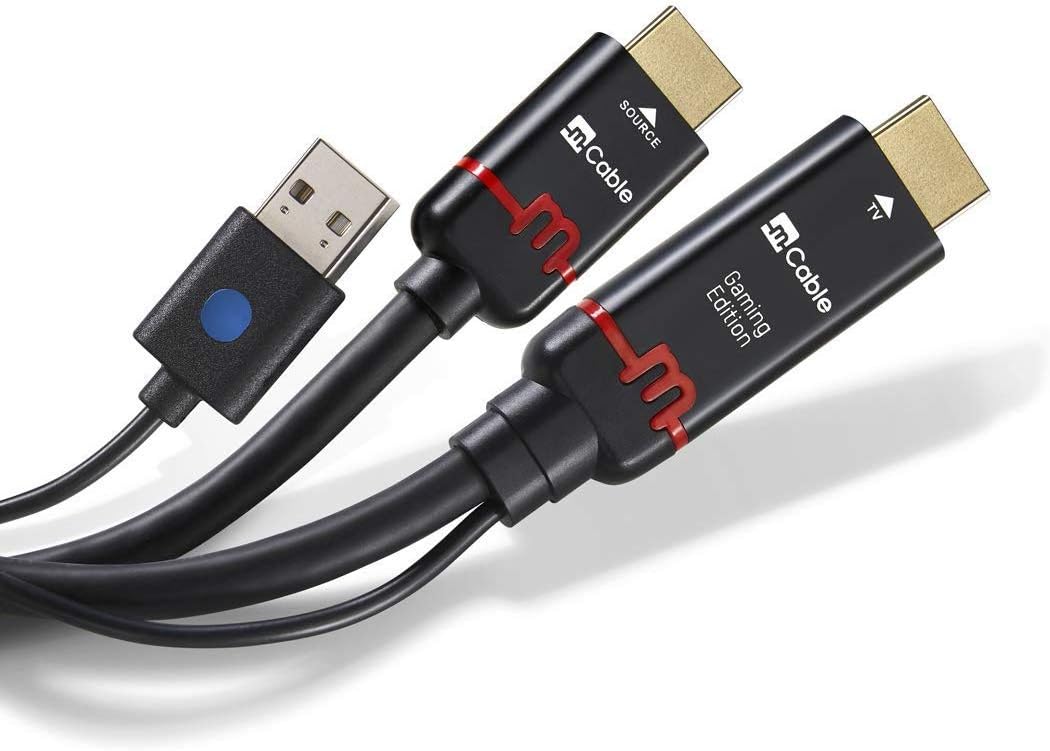
The Marseille Inc. mCable Gaming Edition is a 3-foot HDMI cable designed to enhance your gaming experience with its built-in computer that improves image quality, reduces lag to under 1 millisecond, and supports ultra-high frame rates up to 1080p at 120 FPS. Compatible with all major gaming consoles, it utilizes patented algorithms to eliminate visual artifacts, ensuring a smooth and immersive gameplay.


| ASIN | B075M4YDV8 |
| Best Sellers Rank | #41,072 in Video Games ( See Top 100 in Video Games ) #375 in Wii U Accessories #1,748 in Wii Games, Consoles & Accessories #3,145 in Xbox Games, Consoles & Accessories |
| Brand Name | Marseille |
| Cable Type | HDMI |
| Color | Aluminum Black/Red |
| Compatible Devices | Tablet |
| Compatible Phone Models | No Compatible Phone Models |
| Connectivity Technology | HDMI |
| Connector Gender | Male-to-Male |
| Connector Type | HDMI |
| Customer Reviews | 4.1 4.1 out of 5 stars (566) |
| External Testing Certification | Não aplicável |
| Global Trade Identification Number | 00864601000100 |
| Indoor Outdoor Usage | Indoor |
| Item Length | 3 Feet |
| Item Weight | 0.3 Pounds |
| Manufacturer | Marseille Networks |
| Model | M010001-3G |
| Model Name | Marseille mCable |
| Number of Pins | 19 |
| Other Special Features of the Product | Data Transfer, High Speed |
| Recommended Uses For Product | Gaming |
| UPC | 864601000100 |
| Unit Count | 3.0 Feet |
D**S
Necessary accessory
Update: I have used this on multiple television sets at this point, it's still a 5 star ⭐⭐⭐⭐⭐ product. Always the same 360 console. Works best on large television sets. I'm currently using it on a 1080p 50" sharp television, with my 360 set to 720p. The in-game image is really nice with this cable, significantly better than without it. If you are familiar with PC gaming then you may be aware of SweetFX, ENB, ReShade, and so on. Back in the day I used to game on my friends pc which was more powerful than mine, and he would show off with sweetfx filters to make the games pop more. Yes it upscales and uses that extra space to add effects without sacrificing clarity; like yes there is AA happening; there is also a noticeable enhancement of line; speculatively I think i see an anti-dithering. I used this for my Xbox 360 because I am a PC gamer and my recent purchase of an RGH system was disappointing in the graphics department. For many games I have the Steam copy as well as the 360 version. Just seeing these on the 360, games like Crysis, Tomb Raider, Half Life look far inferior. I could do a side by side comparison and I thought the console resolution is a real downer, more so than the texture size. I play PC games at 1080p w/ max settings in game and 8x AA applied on top of the game settings via the nvidia control panel. With this mCable the texture resolution is more of a noticeable factor, this is the cable's fault in that now with the better display resolution I can actually see the textures better. When I saw this product and the reviews I thought it was going to be just what I needed to bring the 360 closer to what I'm used to. I would like to point out that the jaggies in Gears of War were so bad that I found that game unplayable before and now its not so bad. It's not a huge improvement, and some games seem to benefit from the methods used more than others. It would be really nice if I could edit the effects it uses, or even crank up the FXAA. At no point does it cause blurry images like you might get from too much AA (note that I personally prefer excessive AA). I'm not a competitive gamer so I would tolerate some lag if it were present, I would even embrace a frame or two of lag if it was using that for TAA type effects. It's a moot point anyway, since it is lag free. In playing Rise of the Tomb Raider and FarCry 3 it really clicked with me that there is a particular effect present that does, ever so slightly, alter the mood. For those two games in particular the PC version at very low still has significantly better textures than the 360 version, and the upscaling effects make the end result look more cartoonish. The saddest part for me right now though, is that my TV died and I'm using a cheap stand-in. The TV I'm currently using, while 1080p, is a vizio brand. I actually get a better picture on this TV without the mCable and with the console set for 720p.
R**X
Not Snake Oil! Great for X-Box 360 and PS3
The only case I found for keeping it was with my PS3, which did perform as advertised. The main reason I bought this cable was to use with my RGB modded N64 through an OSSC. Using the game shark code, I removed the first pass of antialiasing. Then I hoped upscaling from 480P --> 1080p with the cable and adding AA at the last step would result in a cleaner soft image. It did, but it also stretched the 4:3 content to 16:9 instead of integer scaling, which looks bad. I used HD Retrovision SNES component cables to the OSSC in Line Double mode. Also there was no sound. In Line 3x mode it had the correct aspect ratio, but still no audio, and the screen was peppered with graphical artifacts. It's clear the OSSC has issues with this cable or visa-versa. I would have liked to try it on an UltraHDMI modded N64 with Deblur enabled in addition to the disabled first AA pass. Sadly I'm still waiting on mine. I tried Dreamcast via D-sub 15 to the OSSC. No audio and screen was stretched to 16:9. It did look pretty amazing, if it were not for that aspect ratio. No setting I could find fixed it. The cable must do it on it's own. ***EDIT*** I discovered that the audio issue can be resolved by toggling the audio source in the OSSC menu. It seems to be caused each time the game switches from 480i and 240p, so certain games and consoles will run into issues with this combination (N64 for example). That's very annoying. I don't have this issue with a regular HDMI cable. The 16:9 stretching can be fixed by toggling the TV aspect ratio to normal, which squeezes the picture back to 4:3. However, be aware that not all TVs are flexible in this regard. My VIZIO P-series is on a power trip and stubbornly reminds me "it's already in the best mode", disabling other aspect modes (which is a stone wall slap in the face). A true upscaler like the Micomsoft XRGB mini framemeister has options to crop and scale the image displayed. So I could get around this issue by adding it to the chain. For example, N64--(Component)-->OSSC--(mCable)-->Framemeister--(HDMI)-->TV. Unfortunately, the cost of doing that is prohibitively high with the Framemeister costing over $300, the OSSC over $150, and the mCable around $100. Not to mention that the framemeister is soon to be discontinued, adds about a frame of lag, and is another thing taking up space in my AV setup (not to mention the rats nest of wires). ***EDIT*** There is no point in keeping the cable Just for movies, as there is a cinema version that is less expensive. I am not willing to keep it just for PS3/X-Box 360, which IMO look fine on a 4K TV without this cable. I was under the impression that it would upscale 1080p content to 4k, but it didn't work for me... ***EDIT*** Actually, it does. However, it only does so for 1080p 24Hz content, like movies. I watched a BluRay on my PS3 upscaled to 4K and it does look better than without the mCable. 1080p games don't upscale to 4K because they run at 60 FPS (Hz) and the mCable can't do that. For them it adds nothing to the image. It does upscale 480p/720p --> 1080p, with good, lag free, Anitaliasing. You'll need to change the settings in your PS3/X-BOX 360 to output in 720p instead of 1080p. In the PS3 at least you can change the BluRay video output separate from Games, so both 1080p for games and 4k for BluRay will be handled by the cable. The stretch to 16:9 aspect ratio may be an issue if your TV doesn't allow you to squeeze it back to 4:3, if you plan on using this cable to play SD era games. ***EDIT*** Bottom line: If you want to smooth out jagged lines on 720p era games (PS3/X-Box 360) then this will work great. If you only want to upscale BluRay to 4K for a modest bump up in picture quality, buy the cinima cable. If you own a PS3, get the Gaming edition. If you thought of pairing it with an OSSC to handle retro games, they don't play nice! You may need a frameister to solve aspect ratio issues, it your TV rudely refuses to.
M**O
It also boosts contrast and upscale content better than my TV can
This is one pricey HDMI cable but it does exactly what it claims! I purchased it mainly for the anti-aliasing capabilities and I have to say it works flawlessly for that purpose. It also boosts contrast and upscale content better than my TV can. Is it worth the price tag though? That depends on what you use it on... Essentially, the lower the resolution you pair this cable with the better it will work. I purchased the cabe for my base PS4 while thinking that if it did not make much of a difference I'd just use it on my PS3 instead. Well, I was so amazed with the results on the PS4 that I now plan on purchasing another cable for my PS3 so I don't have to share one cable. The cable literally "fixes" some games on PS4. Dead or Alive 5, Resident Evil 4-6, Nier Automata, and Dragon Age Inquisition are some of the games I have that benefitted the most. For Resident Evil 4-6 It seemed like I was playing a different game altogether... I also noticed a big boost to contrast with blue ray movies; Ghost in the Shell was very impressive piped through this cable! I have a 2012 Samsung LED backlit TV so it's pretty old by now and I can only imagine how much better this would look with an OLED TV. Some people have mentioned having isues with the USB connector and flickering images. I haven't experienced that myself as I have the USB connector plugged directly to the TV and it's working as intended.
A**X
First time buying a luxury item for the switch but after watching reviews wow this cable did not disappoint only for the gamers who are willing to pay a high price be warned it is Luxury for the price makes a difference but not a massive one still worth it if you have a switch I would say since it is not yet in 4K
N**R
The item performed as described, however the ends might get a little hot
J**Z
Es un poco caro pero vale la pena si te gusta la imagen, el Mcable Gaming aparte de escalar los juegos de 480p a 1080p también le da mejor contraste a la imagen y mete antialiasing a la imagen, lo compre para hacer una cadena de video para el ps3, mi configuración es ps3 + divisor hdmi + Mcable Gaming + Switch HDMI + Mclassic + Mcable Cinema + Morph 4k, con este combo consigo una calidad de imagen brutal en 4k.
A**T
Sin duda mejora la Switch, sobre todo en juegos de mundo abierto Youka lele, Doom, Mario Odyssea, lo único que me llama la atención el calor que genera el cable después de 30 min de uso, pero sin duda es mejor que en videos que había visto por la red, solo un juego se puso lento con el cable El NBA 2k Playgro.., se ve a mi marcados menos de 25 fps, pero si se cambia a cámara fija se resuelve el problema, juntar dos cables el gaming y el Ultraedition mejora mucho la cálida de imagen, ojo no soporta HDR, NI 4K a 60Fps sólo a 30 fps.
E**R
Only tried Firewall so far, but the picture looks around 20% sharper & clearer. As for 4K VR videos, they are around 30-40% sharper & clearer.
Trustpilot
4 days ago
1 week ago